Buy Apple Gift Card with Crypto
Buy an Apple Gift Card with USDT, BTC, ETH or other crypto and receive your digital code instantly. Choose the correct region, select an amount, and pay directly from your crypto wallet. Redeem the code for eligible apps, games, subscriptions, media, and more.
GiftKoin adds no checkout fee to supported stablecoin payments. Your wallet, exchange, or blockchain network may charge a separate fee.
This Norway card can only be redeemed on an Apple Account registered in Norway.
 USDT
USDT

-
Authentic Code
Sourced from official distributors
-
Instant delivery
Your code arrives in seconds
-
Fair Refund Policy
Full refund if we can't deliver
-
24/7 Support
Real answers, fast response
Why Buy an Apple Gift Card with Crypto?
Apple does not list cryptocurrency as a direct Apple Account payment method.
GiftKoin lets you use crypto to purchase a digital Apple Gift Card instead. Pay with USDT, USDC, BTC, or another available cryptocurrency and receive your code after confirmation.
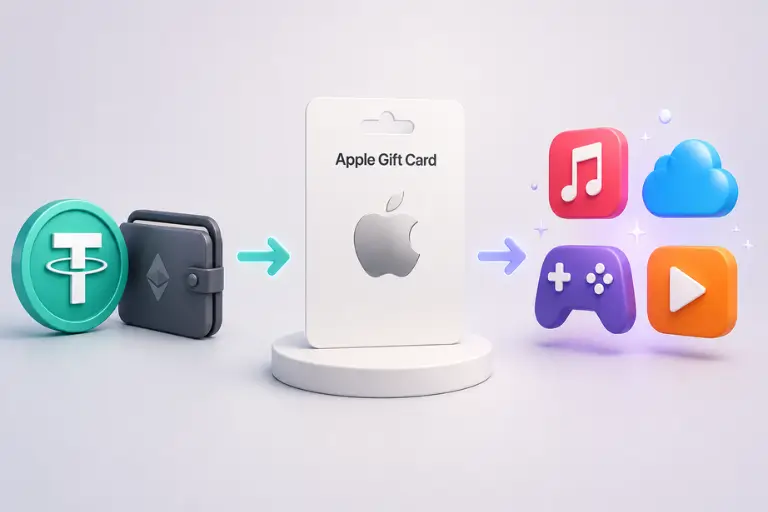
Benefits include:
Pay from your crypto wallet: No bank card is needed at GiftKoin checkout.
No GiftKoin fee on supported stablecoins: Eligible stablecoin payments do not receive an added checkout fee.
Fast digital delivery: Your code appears after the required blockchain confirmations.
Regional options: Choose a gift card that matches your Apple Account region.
One Apple Account balance: Pay for many eligible Apple purchases from a single balance.
What Can You Buy with an Apple Gift Card?
After you redeem an eligible gift card, its value is added to your Apple Account balance. What you can purchase depends on your country, card type, and Apple’s regional rules.
Your Apple Account balance is typically used first for eligible purchases, helping you manage spending without relying on a bank card for every transaction. However, some purchases or subscriptions may still require an additional payment method on file, depending on Apple’s policies and your region.
Apps, Games, and In-App Purchases
Use your Apple Account balance for eligible paid apps, games, in-app features, and in-game currency.
The transaction must be processed through the App Store.
Subscriptions
Your balance may cover eligible subscriptions, including:
Apple Music
Apple TV
Apple Arcade
Apple One
iCloud+
Third-party subscriptions billed through the App Store
Keep enough balance available before each renewal date. Apple may require another payment method for certain recurring charges.
Movies, Music, and Books
Use eligible Apple Account balance for movies, television content, music, audiobooks, and books available through Apple services.
Availability varies by region.
Apple Products and Accessories
In regions that support the unified Apple Gift Card, you may also be able to purchase eligible Apple products and accessories.
Purchasing options vary by country, gift card type, and checkout method. Check the regional card instructions before buying.
How to Buy an Apple Gift Card with Crypto on GiftKoin
1. Choose the Correct Region
Select a gift card for the same country or region as your Apple Account.
For example, a US Apple Gift Card should be used with a US Apple Account.
2. Select an Amount
Choose one of the available denominations.
A custom amount may also be available for selected products.
3. Choose Your Cryptocurrency
Select USDT, USDC, DAI, BTC, ETH, TRX, BNB, or another available cryptocurrency.
For tokens supported on multiple networks, carefully select the correct blockchain.
4. Send the Exact Amount
GiftKoin displays the payment address, network, amount due, and payment status.
Send the exact cryptocurrency amount using the network shown at checkout. Your wallet or exchange may add a network or withdrawal fee.
5. Receive Your Code
GiftKoin monitors the payment on the blockchain.
After the required confirmations, your Apple Gift Card code appears on the order page. Copy it and store it securely until redemption.
Which Cryptocurrencies Can You Use?
Available payment options may include:
USDT
USDC
DAI
BTC
ETH
TRX
BNB
Stablecoin Payments
GiftKoin adds no checkout fee to supported stablecoin payments. This means the GiftKoin price is not increased by an additional payment fee when you use an eligible stablecoin.
Your wallet, exchange, or blockchain network may still charge a transaction or withdrawal fee.
BTC, ETH, and Other Cryptocurrencies
Payments made using assets with changing market prices may include a checkout fee to account for price movement while the blockchain transaction is being confirmed.
The complete amount and any GiftKoin fee will be displayed before you send payment.
Regional Apple Gift Card Guides
How to Redeem an Apple Gift Card
Your code is displayed after the required payment confirmations. It is a 16-character code that starts with "X".
Before redeeming it, make sure the gift card region matches your Apple Account region.
On an iPhone or iPad
Open the App Store.
Tap your profile picture or sign-in button.
Tap Redeem Gift Card or Code.
Select Enter Code Manually.
Enter the code and tap Redeem.
Where supported, you may also be able to redeem the code through the Apple Account card in Wallet.
On a Mac
Open the App Store.
Click your name or the sign-in button.
Click Redeem Gift Card.
Sign in if requested.
Enter the code and complete redemption.
On a Windows PC
Open the Apple Music or Apple TV app.
Click your name in the sidebar.
Select Redeem.
Sign in if requested.
Enter the gift card code.
Apple may change its menus or redemption options. Follow the instructions displayed on your device if they differ.
Terms and Conditions
GiftKoin Apple Gift Card codes are digital products. Codes are displayed after the required blockchain confirmations.
Orders cannot normally be cancelled, refunded, or exchanged after the code has been delivered. Exceptions may apply where required by law.
Contact GiftKoin support if a delivered code is invalid, previously redeemed, or different from the product ordered. GiftKoin may request order details, screenshots, or other reasonable evidence.
Apple Gift Cards are region-specific. You are responsible for selecting a card that matches your Apple Account country or region.
Treat your code like cash. Do not publish it or send it to anyone requesting payment, account recovery, technical support, taxes, fines, or verification.
After redemption, your Apple Account balance and purchases are governed by Apple’s applicable terms and conditions.
Nothing in these terms limits statutory consumer rights that cannot legally be excluded.
GiftKoin is an independent gift card retailer. It is not affiliated with, sponsored by, or endorsed by Apple Inc.
Apple, Apple Account, App Store, Apple Music, Apple TV, iCloud, iPhone, iPad, and Mac are trademarks of Apple Inc.
Apple Gift Card FAQs
Need help? Just fill in the form — our team will get back to you shortly.
Talk to supportYes. Choose an amount and region, select USDT at checkout, and send the displayed amount using the selected network.
Your code appears after the required payment confirmations.
Yes. The gift card country or region must match the country or region of your Apple Account.
A US Apple Gift Card, for example, should normally be redeemed on a US Apple Account.
Your code appears after GiftKoin detects the payment and receives the required blockchain confirmations.
Timing depends on the cryptocurrency, network traffic, blockchain, and transaction fee used by your wallet or exchange.
GiftKoin adds no checkout fee to supported stablecoin payments, including eligible USDT options.
Your wallet, exchange, or blockchain network may charge a separate fee.
Depending on the region and gift card type, you may be able to purchase apps, games, in-app content, subscriptions, music, movies, books, Apple products, and accessories.
Some purchases may require another valid payment method.
Possibly. In regions that support the unified Apple Gift Card, the card or redeemed balance may be used for eligible Apple products.
Availability and checkout methods vary by country and card type.
Digital gift card orders cannot normally be cancelled, refunded, or exchanged after the code has been displayed.
This does not limit any rights you may have under applicable consumer law, including when a delivered code is invalid, previously redeemed, or different from the product ordered.
First, check that:
The gift card region matches your Apple Account.
Every character was entered correctly.
The code has not already been redeemed.
You are using an Apple-supported redemption method.
If the code is invalid or already redeemed on your first attempt, contact GiftKoin support. Include your order details and a screenshot of the error, but never share the full code publicly.