How to Buy Telegram Premium With Stars
Published: 13 August 2026
Maybe you've asked yourself this: can I buy Telegram Premium with Stars? The short answer is both yes and no. You can buy Telegram Premium with Stars for other people and gift the subscription to them, but you can't buy Premium for yourself with Stars.
Below you'll find exactly how many Stars each plan costs, the step-by-step gifting flow, the workaround for getting Premium onto your own account, and an honest look at whether paying with Stars actually saves you money. (Spoiler: usually it doesn't.)
Can You Buy Telegram Premium With Stars?
Telegram accepts Stars as a payment method for gifted Premium subscriptions. When you open another user's profile and choose to send them a gift, one of the payment options is your Star balance.
Three limitations matter here:
You can't buy Premium for yourself with Stars. The Gift Premium option only appears on other people's profiles.
There's no 1-month option. Paying with Stars only covers the 3, 6, and 12-month plans.
How Many Stars Does Telegram Premium Cost?
Telegram sets these rates itself, and they're identical in every country:
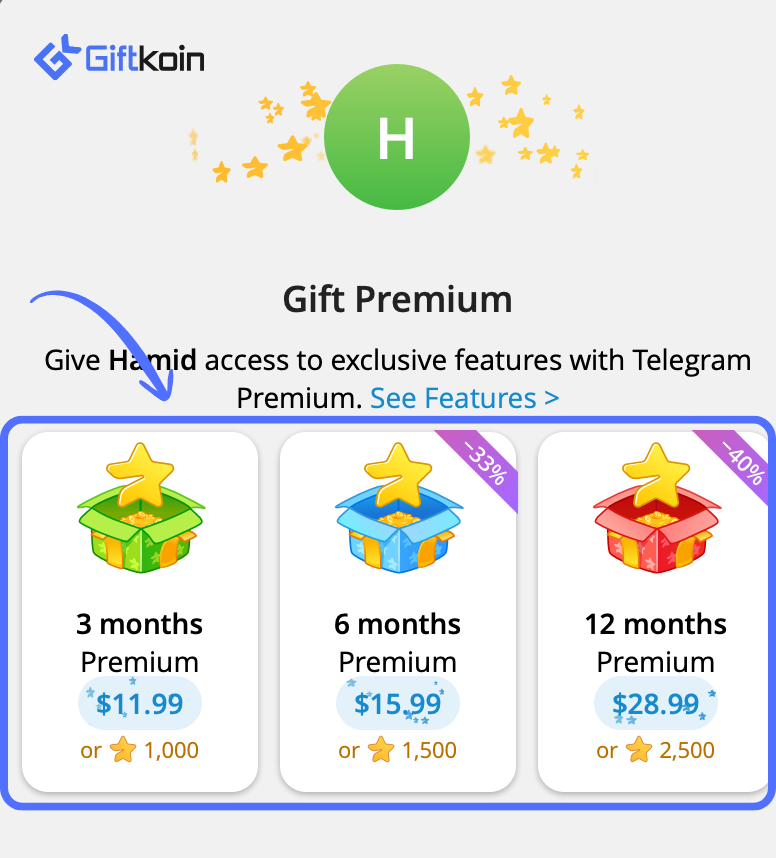
3-month Premium: 1,000 Stars ⭐
6-month Premium: 1,500 Stars ⭐
12-month Premium: 2,500 Stars ⭐
These figures come straight from Telegram's own API documentation and don't fluctuate with exchange rates or regions. If your balance falls short at checkout, Telegram will offer to top you up on the spot.
How to Gift Telegram Premium With Stars, Step by Step
Make sure your Star balance covers the plan you want, then follow these five steps.
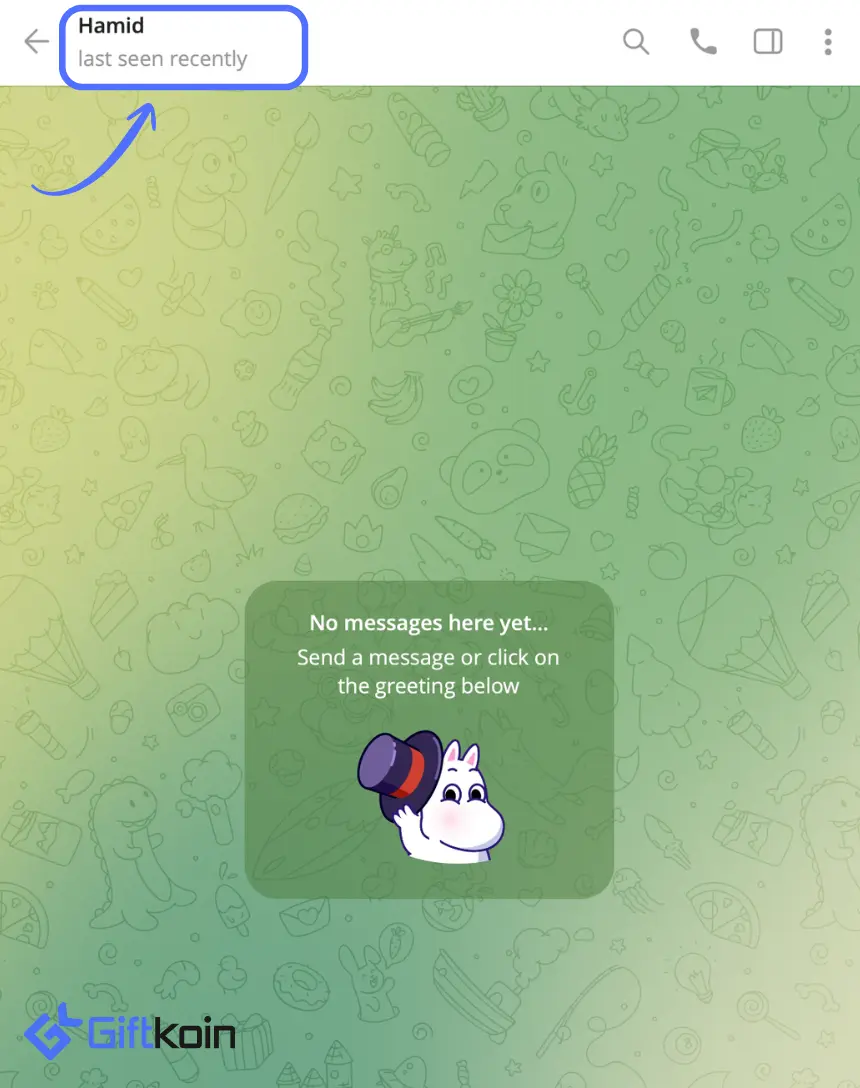
Tap the profile of the person you're gifting to. Double-check the username before you go any further, because a Premium gift can't be recalled once it's sent.
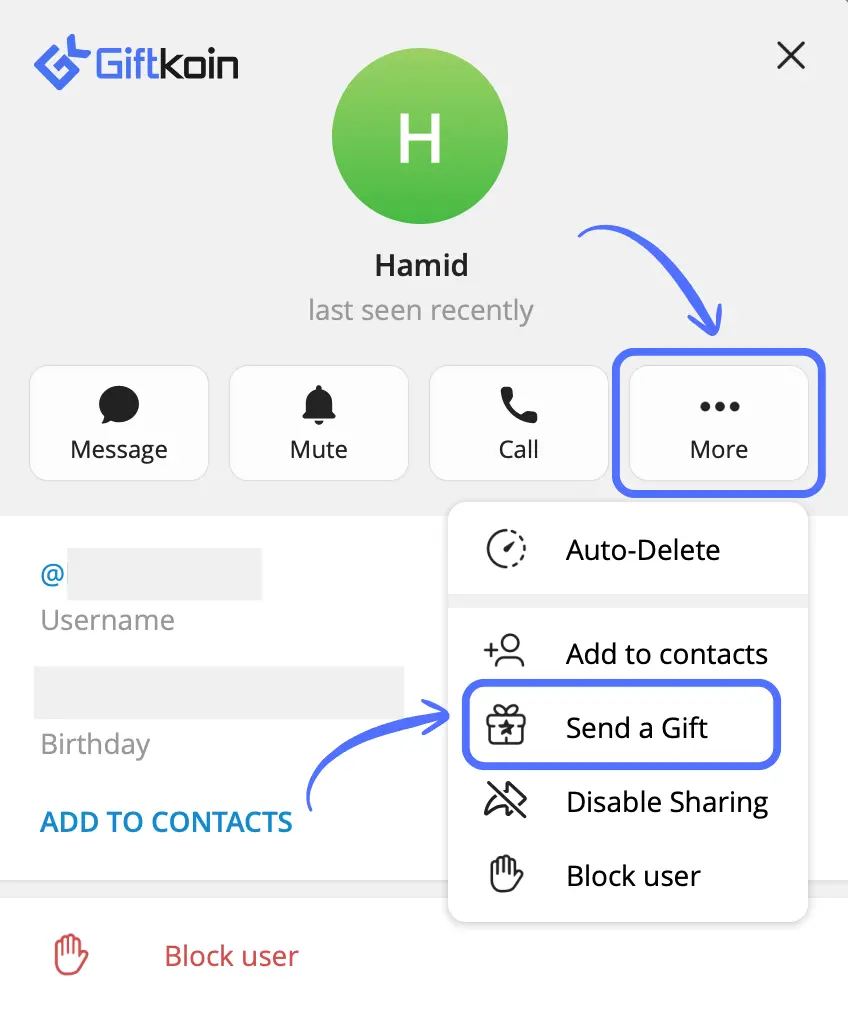
Tap More (the three-dot) and select Send a Gift.
In the Gift Premium section, choose 3 months, 6 months, or 12 months.
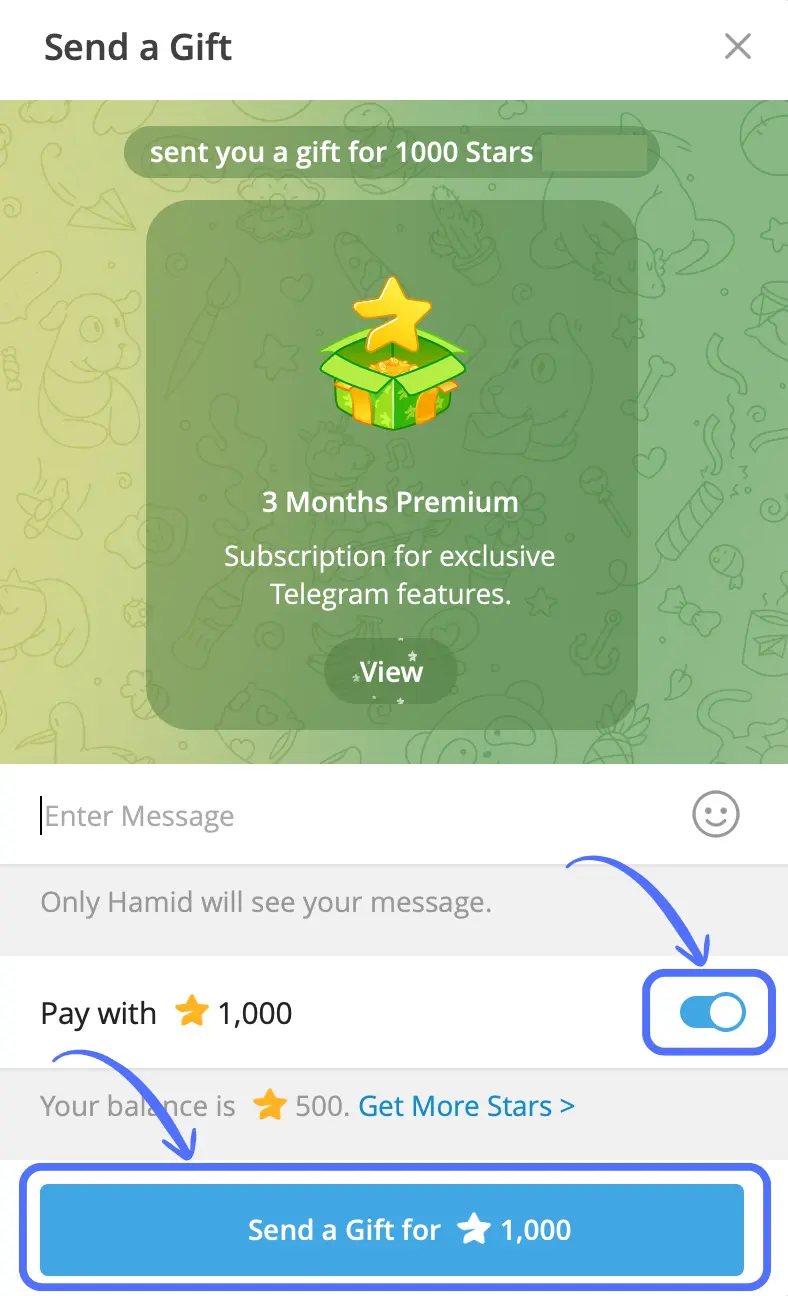
On the checkout screen, enable Pay with ⭐ so the cost comes out of your Star balance instead of your card or app store account. Want to attach a note? Type it into the Enter Message field. It's optional. Tap Send a Gift for ⭐. Premium activates on the recipient's account immediately, and the gift lands in your chat with them.
How to Get Premium for Yourself Using Stars
Since Telegram blocks self-purchases with Stars, you have two realistic options:
The second-account route. Buy Stars on a second account you control (or ask someone you trust), then gift Premium from that account to your main one. Note that you can't move your existing Star balance across, so the Stars have to be purchased on the sending account.
Just buy Premium directly. Skip the detour entirely and put the subscription straight on your own username. It's faster and, as the next section shows, almost always cheaper.
Before You Send: 5 Things Worth Knowing
Verify the username character by character. Send it to the wrong handle and the subscription activates on a stranger's account, with no realistic way to get it back.
Existing Premium isn't wasted. If the recipient already has a subscription, your gift extends it rather than overlapping.
Gifted subscriptions don't auto-renew. When the term ends, it simply expires and nobody gets charged again.
Some accounts can't receive gifts. If Send a Gift doesn't appear, either your app needs an update or the recipient has restricted incoming gifts in their privacy settings.
Star purchases are final. Telegram's terms are explicit that Stars aren't refunded for unwanted or accidental purchases.
Is Paying With Stars Actually Cheaper?
Usually no. Across all three plans, paying with Stars costs more than buying the same subscription directly, even when you source Stars from cheaper channels like @PremiumBot or Fragment rather than the App Store.
The reason is structural. Stars are a middle layer: you pay a margin buying the Stars, then convert them into a subscription at Telegram's fixed rate. Two steps, two markups.
Rough numbers as of 2026:
3 months: 1,000 Stars runs about $14 to $20, while the subscription itself costs roughly $12 to $16.
6 months: 1,500 Stars runs about $21 to $30, versus roughly $16 to $22 direct.
12 months: 2,500 Stars runs about $35 to $50, versus roughly $29 to $36 direct.
The low end of each range reflects Fragment and @PremiumBot pricing; the high end reflects App Store and Google Play, where a 30% platform fee is baked in. Actual prices shift with region, taxes, and periodic sales.
So paying with Stars makes sense in two situations:
You already hold Stars. Since they can't be withdrawn or transferred, spending them on a Premium gift is one of the highest-value things you can do with an idle balance.
You're gifting anyway and Stars are simply the payment method you have available.
If your goal is just the cheapest path to Premium on your own account, buy it directly.
Paying With Crypto Instead
App store checkouts assume you have a card tied to a supported region, which rules out a lot of people, and they add a 30% platform fee for everyone else. Crypto sidesteps both problems.
At GiftKoin you can pick up Telegram Premium or Telegram Stars and pay in USDT, USDC, DAI, Bitcoin, Ethereum, TRON, or BNB. Stablecoin payments carry no extra fee, there's no card required, and delivery is instant.
A practical combination: buy Stars with crypto when you want the flexibility to send gifts, and buy Premium directly when the subscription is the only thing you're after.
Frequently Asked Questions
No. Telegram only accepts Stars for Premium subscriptions gifted to other users. To get it on your own account, either buy Stars on a second account and gift Premium from there, or purchase the subscription directly for your username.
1,000 Stars for 3 months, 1,500 Stars for 6 months, and 2,500 Stars for 12 months. Telegram sets these rates and they're the same worldwide.
No. Telegram's Stars terms prohibit selling, withdrawing, or transferring Stars from your personal balance. The only indirect route is spending them on a gift or Premium subscription for that person.
No. Star payments cover the 3, 6, and 12-month plans only.
Your gift is added to the end of their current subscription. Nothing is lost or overwritten.
Yes, whether or not you write a message. The gift is delivered as a message in your private chat with them, so you're identified either way. The Enter Message field is optional and leaving it blank doesn't make the gift anonymous.
No. Gift subscriptions are one-time. When the term ends, Premium simply expires.
Two common causes: your Telegram app is out of date, or the recipient has limited who can send them gifts in their privacy settings.
No. Once sent, the subscription activates on the recipient's account and the Stars are gone. Check the username carefully before paying.
Almost never, even with Stars bought from @PremiumBot or Fragment. Paying with Stars makes sense mainly when you already have a balance you can't withdraw or transfer.